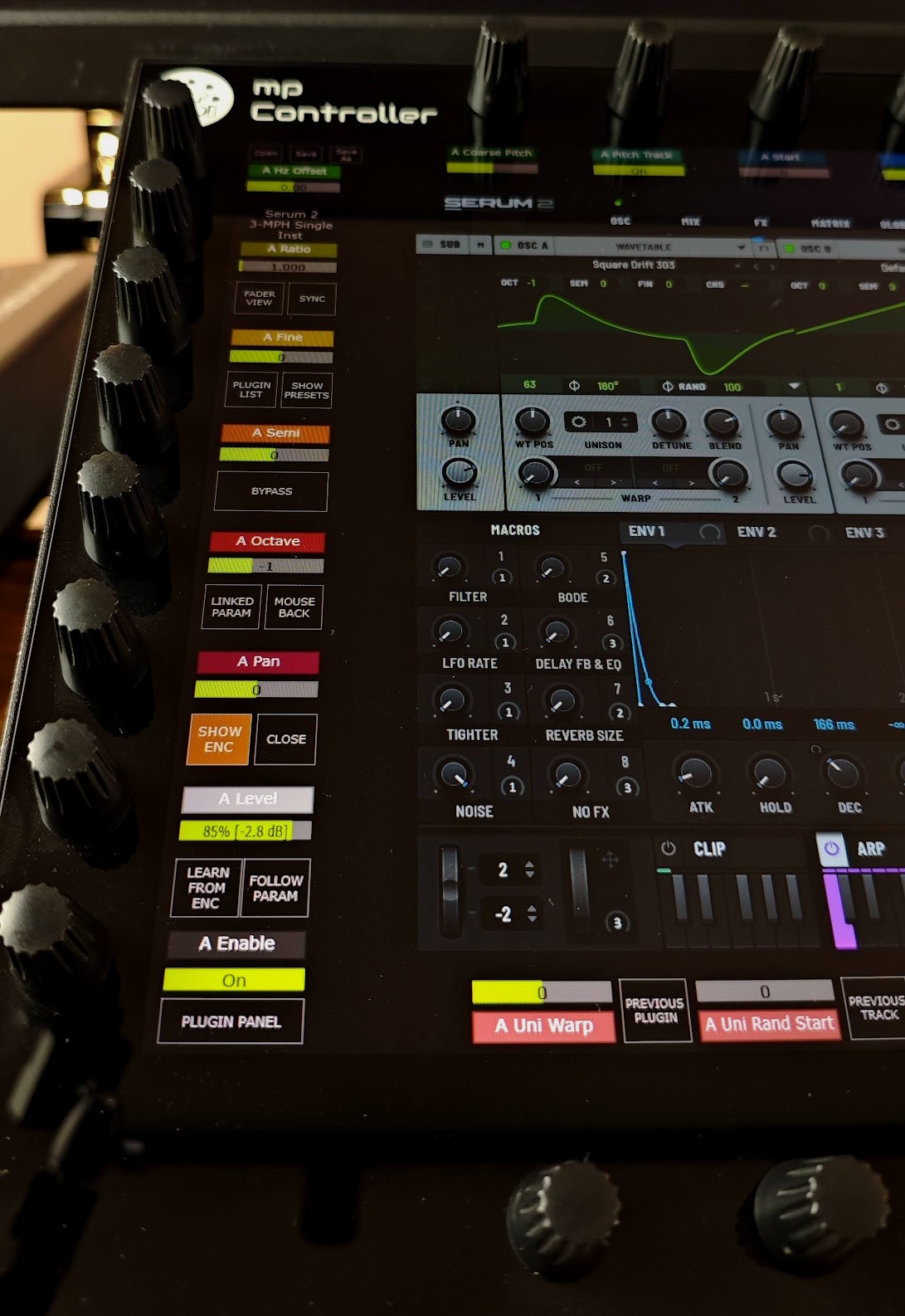
Just touch, gesture and sound.
The difference is not only technical. It fundamentally changes how a person thinks, explores, commits to ideas, and emotionally connects with sound.
A hardware synthesizer or effect device tends to shape music through physical interaction and limitation, while software tends to shape it through possibility and abstraction.
The resulting sound can end up different not because the oscillators are objectively better, but because the creative behavior changes.
That alone changes music.
A traditional plugin workflow looks like this:
human > mouse > cursor > gui > parameter > sound
Every adjustment passes through layers:
And everything is done in series, one parameter change after the other, but never in parallel.
The creative process becomes fragmented.
A hardware instrument feels different:
human > gesture > sound
That is why producers often describe hardware as: inspiring, immersive, expressive, alive.
The MP Controller brings together both worlds. It turns software plugins from something operated… into something performed.
The selected plugin appears directly on the controller display instantly and automatically. No looking back and forth between screens. No searching for windows on crowded displays.
The plugin stays visually connected to your hands and your ears.
Once a plugin opens on the controller, from there you can use the touch screen to switch to other plugins.
Choose the most natural way to interact with sound.
Everything is designed to reduce friction between intention and sound.
Connect. Install. Control.
No manual mapping required. The MP Controller automatically maps plugin parameters intelligently, in an intuitive order inspired by the original plugin design.
Parameters are:
Load a plugin and start controlling immediately. No hours of mapping. No templates required.
You can still edit or create custom mappings and use them every time for specific plugins.
Touch any plugin parameter and the linked encoder begins blinking.
The controller immediately shows you where the parameter is mapped.
Within minutes, muscle memory takes over and the controller begins to feel like a real instrument.
Move through your project without breaking flow. Switch plugins directly from the controller touchscreen.
Open:
No more:
Just touch and continue creating.
The controller is always synchronized with the plugin. The MP Controller syncs with the plugin directly, just like your DAW automates parameters.
This provides:
Change presets and the controller updates instantly.
Open a DAW project and the controller is synced exactly with every parameter as it was saved.
For plugins that use dynamic parameters, like some Kontakt libraries, where parameter names change, the MP Controller has you covered. The controller gets the parameter names and values the moment they change.
Create custom mappings, macros and multi-parameter controls.
Assign:
Shape the controller around your own creative process.
Load up to:
…inside a single Multi Host environment.
Mute, solo and power plugins on or off instantly.
Save entire chains with mappings and reload them in seconds. No remapping required.
Direct control over the output level of every plugin in your signal path, helping you maintain proper gain staging at all times.
Solo, Bypass and Compensate allow you to hear the actual sonic impact of a plugin, not just louder audio.
Blend layered instruments with precision, balance your mix faster and achieve the sound you want instantly.
Each encoder can be adjusted for fast expressive movement or ultra-fine detailed control.
Customize encoder sensitivity:
Need instant fine tuning?
Simply press the Hi-Res button on the touchscreen and all encoders immediately switch to high precision control for subtle adjustments and detailed automation.
Free your main display from crowded plugin windows and keep your creative focus where it belongs.
Switch between plugins instantly, stay immersed in the mix and interact with sound naturally from the controller without interrupting your workflow.
Even when away from the controller, your plugins continue working normally with the mouse.
The MP Controller unlocks the tactile interaction and creative potential that gets lost when plugins are controlled only with a mouse.
Find, load and control plugins without touching the computer.
Load:
All directly from the touchscreen.
Your entire workflow stays focused in one place.
Want to create custom mappings? You can map parameters with ease, fast.
Touch and link continuously to the next encoder. Or select multiple parameters from a list and map them instantly.
Save as a preset and your custom mappings load every time with the plugin.
Store your favorite chains of audio effects or instruments and load them with a single touch.
Solo, bypass or power off the plugins you don't want to use in the chain.
Speed up your workflow and choose instantly the plugin you want to be active in the chain.
The MP Controller controls VST2, VST3, and AU plugins in Pro Tools through an AAX Bridge plugin.
Control chains of VST2, VST3, and AU effects or instruments, navigate plugins directly from the controller, and transform plugin control into a true hardware-like experience.
Plugins on surround and immersive tracks are fully supported, from quadraphonic up to Dolby Atmos beds.
Additional control surface systems that work in parallel with plugin control. The MP Controller comes with the control surfaces for popular DAWs.
The MP Controller is the missing tactile connection between you and software instruments.